In depth
A closer look at Aqua Mail
Aqua Mail is a free email app for personal and corporate email. This is the perfect replacement for your current email app as it provides the flexibility of working the way you are used to. Aqua Mail has plenty of options for customizing the app as well as convenient features which improve your efficiency of managing e-mails. Modify how it looks and works to become more productive. Aqua Mail supports automatic setup for the more popular email providers, works fluently with others, or lets you enter mail server settings yourself. EY FEATURES:
-Multiple email providers: Gmail, Yahoo, Hotmail, FastMail, Apple, GMX, AOL and more;
-Mail accounts hosted at: Google Apps, Yahoo BizMail, Office 365,Exchange Online and others;
-Support for standard Internet email protocols: IMAP, POP3, SMTP; Exchange: EWS;
-Improved security: OAUTH2 authentication for Gmail and Hotmail;
-Instant incoming email delivery (push mail): servers supporting the IMAP IDLE extension (most Internet mail services except Yahoo; self-hosted IMAP servers);
-Integration with: Light Flow, Enhanced SMS - Caller ID, Cloud Print, Apex Launcher Pro, Nova Launcher / Tesla Unread, Executive Assistant, DashClock Widget;
-Integration with Tasker: change settings, trigger mail checks, trigger events based on incoming messages ADVANCED FEATURES:
-Stay up to date with home screen widgets: message counts and message lists;
-Access existing folder structure: synchronize Drafts, Sent, and Deleted Messages of web mail and desktop mail apps;
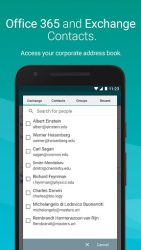
-Access server Contacts: autocomplete from your personal address book and corporate directory (for Exchange and Office 365) when composing messages;
-Sync Calendar: allows two-way synchronization of Calendar events (for Exchange and Office 365);
-Format your messages and signatures: insert images and links, add colors and styling to text;
-Save attachments as files;
-Browse messages grouped into conversations (can be turned off);
-Reply via voice input: Android Wear notifications with message previews and actions;
-Undo message operations:-Delete,-Move to folder, and other actions can be reversed;
-Backup and restore your accounts and settings: via popular cloud services (Dropbox, OneDrive, Box and Google Drive) or a file;
-Optimize for your internet connection: separate settings for WiFi and mobile data. PREMIUM FEATURES:Get the Aqua Mail Pro Unlocker app from Google Play to access the full functionality of the app:
-Push mail for Exchange (corporate email) in the Pro version
-Add more than two accounts;
-Use identities;
-Remove the promo signature in the messages you send. OS REQUIREMENTS: Android 4.0.3 or higher CONTACT US:
Verdict
Should you install Aqua Mail?
Aqua Mail is an Android application available under the
Freeware
license — the APK is 7.90 MB.
We’ve catalogued it under
Business.
✓
Verified clean. Every Aqua Mail APK on SoftLookup is scanned for malware, spyware, and adware. We re-test on every update.
Sponsored
At a glance
Aqua Mail specifications
- Publisher
- MobiSystems
- Last updated
- Feb 13, 2026
- License
- Freeware
- Operating system
- Android
- File size
- 7.90 MB
- Price
- Free
- Page views
- 1353
Sponsored
Help fellow users decide. Share your experience with Aqua Mail.