In depth
A closer look at Automate
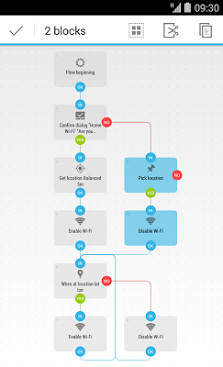
Automate various tasks on your Android smartphone or tablet. Create your automations with flowscharts, automatically change settings like Bluetooth, GPS, Wi-Fi, NFC or perform actions like sending SMS, e-mail, based on your location, the time of day or any other triggered event. You can automate almost everything, Automate even supports plug-in made for Tasker and Locale. Logical fun You edit flowcharts, just add blocks and connect the dots to create your automated tasks. Simple, yet powerful Novices can pick from predefined options, while power users may use expressions, variables and functions. Share Your automation flows are safe and easy to share using the in-app community: llamalab.com/automate/community/ Secure Only grant Automate the Android permissions youre actually using. Building blocks Automate includes more than 280 blocks to build with, including actions, conditions, event triggers, loops and more: Start or kill app activity or service Send or receiver Intent broadcast Use Tasker and Locale action, condition and event plug-in UI automation; tap buttons, back, home, etc. Check foreground or installed app Clear app cache Execute (root) shell command Reboot or shutdown device List, copy, delete, move, zip or unzip file List, upload, download and delete file on Google Drive and FTP server Internet download and REST calls using HTTP request Cloud messaging: communicate with other devices Compose or send e-mail, Gmail, MMS and SMS Check Gmail unread count Await sent or received SMS Await incoming or outgoing call Make phone call Get location and geofencing Geocoding Check nearby cell tower Scan nearby Bluetooth devices, iBeacon, Eddystone beacons Scan or write NFC tag Check or change account data sync, airplane mode, AppOps, app notifications, attention light, audio volume, auto-sync, battery level, Bluetooth - USB tethering, Bluetooth, Bluetooth SCO, car - night mode, CPU speed, docked state, CyanogenMod profile, flashlight, GPS, input method (keyboard), interruptions, mic mute, mobile data, mobile network (2G/3G/4G), mobile operator, mobile signal strength, network type, NFC, power save mode, power source, ringer mode, ringtone, roaming, screen brightness, screen orientation, sound/noise level, speakerphone, system settings, system language, timezone, Wi-Fi, Wi-Fi hotspot, Wi-Fi signal strength, wired headset Check acceleration, device orientation, light, magnetic field, temperature, personal activity, pressure, proximity and significant motion sensor Take picture with camera or screenshot Set image/live wallpaper Play or record audio, video or text-to-speech Control or await media player change Transmit IR Read media (Exif/MP3) tags Show toast message and over 20 different dialogs Show, hide, await or cancel notification Vibrate Get or set clipboard content Get or create calendar event Get contact Add alarm or timer Check mobile and Wi-Fi data usage or throughput Listen for speech recognition or Google Now voice command Await motion gesture or headset button press Get weather Ping Wake-on-LAN See the online documentation for a complete list of blocks and functions: llamalab.com/automate/doc/index.html
Verdict
Should you install Automate?
Automate is an Android application available under the
Freeware
license — the APK is 4.2M.
We’ve catalogued it under
Utilities.
✓
Verified clean. Every Automate APK on SoftLookup is scanned for malware, spyware, and adware. We re-test on every update.
Sponsored
At a glance
Automate specifications
- Publisher
- Developer
- Last updated
- May 4, 2026
- License
- Freeware
- Operating system
- Android
- File size
- 4.2M
- Price
- Free
- Page views
- 1104
Sponsored
Help fellow users decide. Share your experience with Automate.