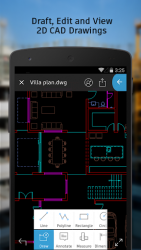
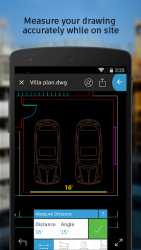
Autodesk AutoCAD 360 the official AutoCAD mobile app. Take the power of AutoCAD wherever you go! AutoCAD 360 is a free DWG viewing application, with easy-to-use drawing and drafting tools that allow you to view, create, edit, and share AutoCAD drawings across web and mobile devices- anytime, anywhere. Simplify your site visits with the most powerful drafting and editing tool available. The AutoCAD 360 mobile app offers an abundance of features and capabilities. Upload and open 2D DWG drawings directly from email or external storage and view all aspects of your DWG file, including external references, layers, and image underlays. Upgrade to AutoCAD 360 Pro to enable editing and drawings tools. Whether working online or offline, in the office or in the field, design every detail, everywhere. Whether you want to draft, view or mark up a DWG file, AutoCAD 360 has the plan thats right for you. Features: Free Pro trial for new users with absolutely no obligation Open and view your DWG files Measure accurately while on site View a drawings coordinates Use multi-touch zoom and pan to easily navigate large drawing Work offline and sync your changes once back online External cloud storage connectivity- View drawings from Google Drive, Dropbox, OneDrive, and more Use GPS to orient yourself within a drawing Improve communication by adding comments and images and invite responses using the Design Feed Share your designs with others directly from mobile Plot designs to PDF or DWF and share them via email Use the free companion web app to easily access drawings from web browsers AutoCAD 360 Pro subscription advantages: New drawing creation Support for larger files and increased storage capacity All drawing and editing tools, including advanced tools, such as arc, offset and more! Draw and edit shapes with accuracy using object snap and new keypad feature (keypad available on iPad only) Select, move, rotate, and scale objects Editing capabilities are also available directly from external cloud storage files Add and edit text annotations directly on your drawing; no need for paper mark-ups Advanced annotation tools, including: cloud, mark up, arrow and more! Advanced layer management View and edit object properties Block palette containing all the existing blocks from the drawing, to allow the user to insert blocks Additional drawing tools and ability to view drawing coordinates Personal customer support via priority email channel Share your thoughts with AutoCAD 360 by leaving a review here in the Google Play Store or by contacting us via Facebook (/autocad360), Twitter (-autocad360), or Pinterest (/autocad360). AutoCAD 360 Pro subscription plans are available in the following options: AutoCAD 360 Pro monthly for $4.99 AutoCAD 360 Pro annually for $49.99 (save $9.89 vs. monthly membership) AutoCAD 360 Pro Plus annually for $99.99Subscriptions will be charged to your credit card through your iTunes account. Subscriptions are automatically renewed unless cancelled at least 24-hours before the end of the current period. You will not be able to cancel a subscription during the active period. Manage your subscriptions in your Account Settings after purchase. - Free products and services are subject to the Autodesk, Inc. terms of use that accompany them.
AutoCAD 360 6.11.0
It is the official autocad software for mobile devices. This free application allows you to view edit and share everything made by this popular 3d drawing program from your android device. Open any project that you have synchronized with your autocad account and perform basic edits using drawing tools moving objects resizing etc. You don't even need an internet connection to work - do what you need to do and it will synch again when you do have online access. Pp another interesting feature in the free version of autocad 360 allows you to share your work with other users. You can also add notes and images to complement the project from the program039s interface. It's possible to print documents from the program thanks to the eprint and share service. Ppautocad 360 is a very useful tool for frequent autocad users who now have the ability to take their work everywhere whether or not there is internet access. A paid pro version can be purchased to gain access to many more features.
AutoCAD 360 is an Android application available under the
Freeware
license — the APK is 24.57 MB.
We’ve catalogued it under
Business.
Help fellow users decide. Share your experience with AutoCAD 360.