In depth
A closer look at Fonter - Font Manager - ROOT
HOT TO RESTORE TO DEFAULT FONT: use root explorer, delete fonter font files under dir /system/fonts/, fonterXXXX.ttf files. The Android System have a lot of custom ROMs, the following list devices can not working with Fonter- 4.2.1 Jiayu G3S- LG G3- HTC Desire 310- Sony xperia m2 android 4.3 maybe cause Bootloop after change font. please backup your data first.
- Coolpad , can not change font with Coolpad custom rom.
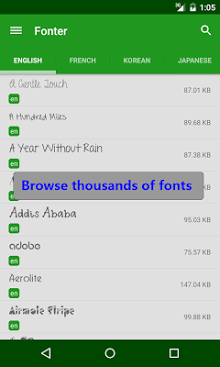
- hw G610-U20, change system font maybe cause BOOTLOOP. - MOST devices need root to change font - You can Google Root ,such as root nexus 4 , to learn how to root your phone. Please not give us one star because your phone not have root ! Thanks! Fonter is the best font manager on Android,can CHANGE SYSTEM FONT , CHANGE SYSTEM EMOJI, CHANGE APP-s FONT and FONT COLOR, post STYLED TWEET without 140 words limit, also have thousands of fonts for you. Samsung 4.2+ system need root to change font. Fonter is desigined to change your phone-s font, or just change an app-s font. It-s super easy to use, change every app-s font every day! If you find Fonter is useful, please rate a five star
Verdict
Should you install Fonter - Font Manager - ROOT?
Fonter - Font Manager - ROOT is an Android application available under the
Freeware
license — the APK is 3.3M.
We’ve catalogued it under
Utilities.
✓
Verified clean. Every Fonter - Font Manager - ROOT APK on SoftLookup is scanned for malware, spyware, and adware. We re-test on every update.
Sponsored
At a glance
Fonter - Font Manager - ROOT specifications
- Publisher
- Developer
- Last updated
- Feb 17, 2026
- License
- Freeware
- Operating system
- Android
- File size
- 3.3M
- Price
- Free
- Page views
- 876
Sponsored
Help fellow users decide. Share your experience with Fonter - Font Manager - ROOT.