In depth
A closer look at Custom Notification
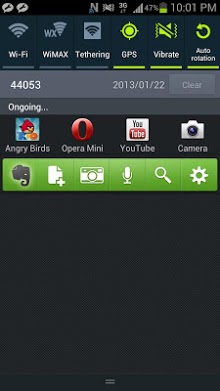
You can put Shortcuts, Widgets, Apps on the Notification area using Custom Notification. You can use the notification area like a launcher. The launcher can be easily customized by Drag and Drop. HOW TO USE 1. Start the Custom Notification. 2. Press the Shortcuts, Widgets or Apps button to place icons. 3. Freely arrange them by Drag and Drop. (You can delete them by dropping them on the trash) 4. Select the priority of the notification. (Only Jelly Bean) No status icon makes the icon in the status bar hidden, but the notification is collapsed (You can expand it). SUPPORTED OS Android 4.0 and higher (ICS and JellyBean) Some limitations shown below exist on Android 4.0.
- The height of notifications are fixed, so you can put one-line widgets only.
- The status icon cannot be hidden, but can be transparent only. NOTICE- Direct call shortcuts are available on EX version.
- Some widgets can not be placed on the notification (ex. Google search bar).
Verdict
Should you install Custom Notification?
Custom Notification is an Android application available under the
Freeware
license — the APK is 1.3M.
We’ve catalogued it under
Utilities.
✓
Verified clean. Every Custom Notification APK on SoftLookup is scanned for malware, spyware, and adware. We re-test on every update.
Sponsored
At a glance
Custom Notification specifications
- Publisher
- Developer
- Last updated
- Feb 9, 2026
- License
- Freeware
- Operating system
- Android
- File size
- 1.3M
- Price
- Free
- Page views
- 717
Sponsored
Help fellow users decide. Share your experience with Custom Notification.