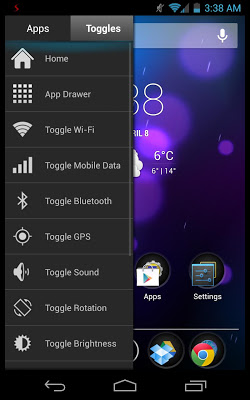
Sidebar Lite- A brilliant new way to multitask on Android Minimalistic, non-intrusive, and very functional- XDA Developer TV The greatest discovery you will make- Android Authority It-s fast, functional, fluid, and customizable to your liking. Populate the sidebar with your favorite apps, and simply swipe in from the edge of the screen to gain instant access to the apps you use most. Simple- yet elegant. Features- Pin apps - toggles to the Sidebar (Limited to 8 total)- Live running apps and running indicators (Pro)- Task management allows killing running apps (swipe running apps out to kill them) (Pro)- Customized colors, opacity, sizes, and positions (Pro)- Starts on boot- Minimal RAM fingerprint and affect on battery life- Ongoing notification can be disabled(4.1+) / made invisible (Pro)- Many widgets to choose from (Home, App Drawer, Wi-Fi, Mobile Data, Bluetooth, GPS, Sound, Rotation, Brightness, Torch, Play/Pause/Skip music) Sidebar Pro Sidebar Pro lifts the limitations put on the lite version and opens access to new customizability as well as functionality- elevating sidebar, to its most impeccable and pure state. Sidebar Pro offers the full set of features. These include:- large items!- Right side swipe!- Live Running apps!- Live Running indicators!- Task Management!- Lock items!- Custom icons!- Full settings!- Adjust width!- Adjust opacity!- Choose color scheme!- Disable notification! (Hidden by default on rooted devices) Development Sidebar is in constant development. Development began as soon as the idea stemmed well before the debut of Ubuntu Phone and recent such apps. The developer ensures a smooth and polished experience. User experience - simplicity are key tp making Sidebar the perfect multitasking app for Android.
Sidebar Lite 4.4.1
The app psidebar lite lets you create a convenient drop-down sidebar in your android phone. By default, the sidebar will appear on the left side of the screen but you can also place it to the right if you prefer (which is more comfortable if you’re a lefty)
sidebar lite also lets you modify the size of the area where you'll use the drop-down feature of the bar, as well as its thickness. Once you have the bar you can of course customize it. Add all the apps you want turn on or off the wifi or activate or deactivate bluetooth. Isidebar lite is a really simple and light app that lets you customize your android phone however you want. The sidebar may not be very useful for some smartphones but it could be incredibly useful for tablets or larger smartphones.
Sidebar Lite is an Android application available under the
Freeware
license — the APK is 3.2M.
We’ve catalogued it under
Utilities.
Help fellow users decide. Share your experience with Sidebar Lite.