In depth
A closer look at AutoVoice
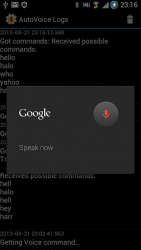
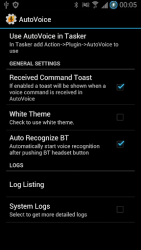
Create custom voice commands for Google Now and automate everything with your voice. Get started here: joaoapps.com/autovoice/Check the FAQ here: joaoapps.com/autovoice/faq/ As seen on- Add custom voice commands to Google Now/Assistant/Google Home and Amazon Echo- Natural LanguageSpeak naturally! You don-t need to remember the exact commands you set up: youtu.be/SboXku53g9o- Say voice commands from your Mac, Windows, Linux PC or another Android device- Takes less than 1 minute to set up a cool new voice commandCreate a new Tasker profile->Set the command filter->create task->done!- Bluetooth headset compatibilityWorks with most bluetooth headsets!- Start recognizing from TaskerSetup complex tasks with multiple voice commands or start recognizing in specific situations. Your limit is your imagination!- Super flexible setup for super powerful profilesWith many custom variables to use, it-s never been so easy to react to voice commands! joaoapps.com/autovoice/variables/- Redirect all phone audio to your Bluetooth headsetYes, all sound from your phone can be on your little non-A2DP bluetooth headset!- React to your Bluetooth headset buttons in TaskerUse the regular call making buttons on your headset to do stuff in Tasker! May not work on all headset models- React to the ambient noise around youCreate a baby monitor, or a clapper. Noise has never been more fun!- Free trialYou have 7 days to try out the unlocked version of AutoVoice for free! After that it-ll revert to the locked version, limited to 4 character commands- Awesome video showing the kind of stuff you can do with AutoVoice Goo.gl/hqWcJ The locked version is limited to commands with 4 characters. If you want to unlock complete commands, you can do it in-app or buy the separate unlock key here: Goo.gl/g8cH IMPORTANT NOTE(WARNING: YOU MUST HAVE TASER INSTALLED FOR THIS APP TO BE OF ANY USE: AutoVoice is only usable as a plugin in Tasker. Please don-t rate it negatively because of this.) If you-re planning to use it, please check if your Bluetooth headset works before buying the full version! If your bluetooth headset fails to be recognized, please try disconnecting it from the phone, rebooting and reconnecting. This procedure is known to help in these situations. Please contact me if anything is wrong and I-ll respond to you promptly and try to fix it as soon as I can.
Verdict
Should you install AutoVoice?
AutoVoice is an Android application available under the
Freeware
license — the APK is 4.30 MB.
We’ve catalogued it under
Utilities.
✓
Verified clean. Every AutoVoice APK on SoftLookup is scanned for malware, spyware, and adware. We re-test on every update.
Sponsored
At a glance
AutoVoice specifications
- Publisher
- joaomgcd
- Last updated
- Feb 17, 2026
- License
- Freeware
- Operating system
- Android
- File size
- 4.30 MB
- Price
- Free
- Page views
- 912
Sponsored
Help fellow users decide. Share your experience with AutoVoice.