In depth
A closer look at Super Switch Widget
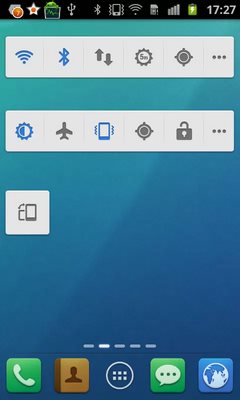
Super Switch Widget is the most powerful tool on your home screen, which provides the fastest way to turn on/off your daily use functions, such as Wifi, GPS, brightness, screen lock, battery. You can just simply drag the toggles to setup your favorite widgets. How to add widget 1.Long press the empty place on home screen 2.Choose Widgets 3.Click SuperWidgets to add. What should I do if I cannot uninstall the app? 1. Open-Settings in Home 2. Select-Location - Security -> Select device administrators 3. Unchecked permission of SuperWidgets 4. REMOVE SuperWidgets as normal Features 1.Wifi,MobileNetwork,GPS,Brightness,Bluetooth,Auto-sync,Airplane mode,Auto-rotate,Vibrate,Ringer,ScreenTimeOut,Lock screen 2.Ringer volume,notification volume - alarm volume 3.Toggle position customization
Verdict
Should you install Super Switch Widget?
Super Switch Widget is an Android application available under the
Freeware
license.
We’ve catalogued it under
Utilities.
✓
Verified clean. Every Super Switch Widget APK on SoftLookup is scanned for malware, spyware, and adware. We re-test on every update.
Sponsored
At a glance
Super Switch Widget specifications
- Publisher
- Developer
- Last updated
- May 5, 2026
- License
- Freeware
- Operating system
- Android
- Price
- Free
- Page views
- 902
Sponsored
Help fellow users decide. Share your experience with Super Switch Widget.