In depth
A closer look at Taskbar - Windows 8 Style
Taskbar- Window 8 style is a tool that mimics Window 8 Taskbar. It comes in handy when you want to launch apps, common settings, favorite contacts quickly. Features :- Start button Tap on the start button to open taskbar. Scroll up/down to launch app. If you add folders, contacts, settings, click on theme to execute.
- Change start button location Click an hold for a while, then move around to change its location.
- Smart Start button Start button will be dimming if taskbar does not open in two seconds. It also learn the way you use start menu area and taskbar, then smartly adjust them for you.
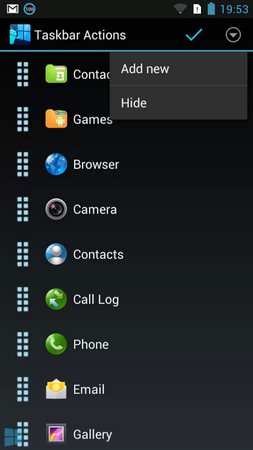
- Reorder apps Open setting > Edit start menu item, then drag the icon in the right and move to change item order.
- Hide apps Open setting > Edit start menu item, then click on action bar > hide to exclude apps.
- Create folder Open setting > Edit start menu item, then click on action bar > add new to add new folder. Type folder name, select icon and folder type. Folder type includes:- Applications- Settings- Contacts- Bookmark More type coming soon: shortcut, quick dial, etc,.
Verdict
Should you install Taskbar - Windows 8 Style?
Taskbar - Windows 8 Style is an Android application available under the
Freeware
license — the APK is 2.1M.
We’ve catalogued it under
Utilities.
✓
Verified clean. Every Taskbar - Windows 8 Style APK on SoftLookup is scanned for malware, spyware, and adware. We re-test on every update.
Sponsored
At a glance
Taskbar - Windows 8 Style specifications
- Publisher
- Developer
- Last updated
- Feb 4, 2026
- License
- Freeware
- Operating system
- Android
- File size
- 2.1M
- Price
- Free
- Page views
- 720
Sponsored
Help fellow users decide. Share your experience with Taskbar - Windows 8 Style.