In depth
A closer look at Advanced Task Cleaner
Making your android phone speed up and saving battery!
Cleaning running applications.
Uninstall apps.
Making your android phone speed up and saving battery!
FOR android 2.2 and above users
In Android 2.2(and above), the SD has been changed where terminating applications will not end the associated services and notifications.
So We Add some features for 2.2 users as below:
1.Press app item and choose End Task option from pop up menu, if you want to kill an app. it will switch to App Info View,Tap the Force Stop button please.
2.It will auto switch to Running Services View(system provided) to end services,after clicking end task button.
HOW TO USE
It Pretty simple:-)
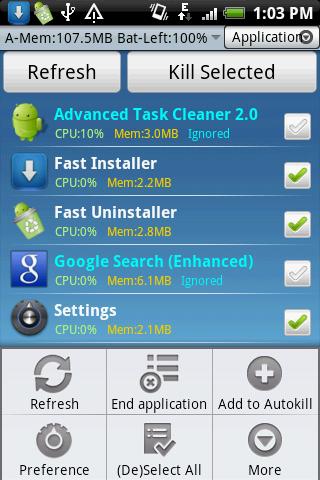
1.Launch this application and take a look at the running applications list, uncheck some applications you don-t want to kill (Such as some system applications). Tap the menu End Application, it will kill all checked applications.
2.Click item to kill/switch/uninstall/see detail tasks in application view tab.
3.Long press item to add/remove ignore list,add/remove auto-kill,manage auto-kill list in application view tab.
4.Long press item to manage,uninstall,switch to/find in market in uninstall view tab.
5.Auto start type : ; Launch Application , Service only(default) or None when boot.
6.Click tool bar to ; hide/show tab.
7.Enable Auto-kill Service ,if you ; want to auto-kill tasks.
8.Long press to add task clean widget on home screen.
9.If force close,send bug report to us by menu--preference--Bug Report.
Verdict
Should you install Advanced Task Cleaner?
Advanced Task Cleaner is an Android application available under the
Freeware
license.
We’ve catalogued it under
Utilities.
✓
Verified clean. Every Advanced Task Cleaner APK on SoftLookup is scanned for malware, spyware, and adware. We re-test on every update.
Sponsored
At a glance
Advanced Task Cleaner specifications
- Publisher
- Developer
- Last updated
- Feb 13, 2026
- License
- Freeware
- Operating system
- Android
- Price
- Free
- Page views
- 1103
Sponsored
Help fellow users decide. Share your experience with Advanced Task Cleaner.