Android · Free download · Utilities
No-frills CPU Control1.28.2
- Operating system
- Android
- File size
- 1.13 MB
- License
- Freeware
- Last updated
- Feb 3, 2026
39 downloads·1214 page views
Android · Free download · Utilities
39 downloads·1214 page views
Screenshots
In depth
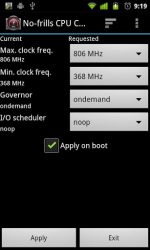
If you dont know what root permissions are, you probably dont need this app. - No-frills CPU Control is a tool you can use on your rooted [1] device to quickly set the CPU frequencies and governor to use.
It allows you to use the highest frequency your phone supports and gain some precious FPS in your preferred game, or go down to the lowest frequency and gain some more juice when your phone is sitting idle.
All of this without any memory footprint or services running in the background! It has been reported working on a large number of rooted [1] devices from HTC, Samsung, Motorola, LG, Huawei, ZTE, Oppo and so on! Even indle and Nook Color! Unfortunately, it does NOT work on Flytouch tablets, Zenithink zt180, HaiPad M7/Tabtech M7 or fake HTC/Samsung clones. Sorry about that, but you knew what you were buying when you did-didnt you? Is your device supported? You need ROOT permissions and youll probably need to be running a CUSTOM ROM (an example is the famous CyanogenMod) with kernel frequency scaling enabled. If you are unsure-just install the app and see for yourself!
Be wary of the frequencies you select! Your phone may lock or become unresponsive if it doesn't like extreme values, but -hey- better safe than sorry: even though No-frills CPU Control allows you to choose if you want to apply the settings on boot, it comes with an extra "safety valve" too! If the device doesn't shut down (or reboot) in a clean way, it will not apply the settings, avoiding those nasty boot-loops you may have had with other overclocking apps. Please keep in mind that apps like QuickBoot are as quick as they are unsafe.
Verdict
No-frills CPU Control is an Android application available under the Freeware license — the APK is 1.13 MB. We’ve catalogued it under Utilities.
At a glance
Help fellow users decide. Share your experience with No-frills CPU Control.