In depth
A closer look at Battery Widget
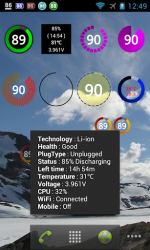
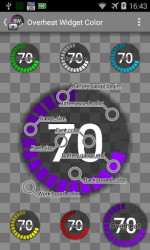
BatteryWidget shows an exact battery level on the status bar, health, temperature, voltage, CPU usage. Clicking once installed widget, the widget shows the temperature and voltage.Double-click the Setup screen appears. English, French, Italian, Polish, Russian, Dutch, Hungarian, Spanish, Chinese support. Feature 1. Charge, Discharge, Warning, Danger, Full charging alarm.2. Battery status indicator on the status bar notifications.3. 1×1, 2×2 widgets in the form of pie charts.4. It is possible to change the color, size and position of the widget.5. Temperature, voltage, battery life, charging, screen status logging. Plus version only 6. Supports the additional status bar icons.7. Widget resolution.8. Wi-Fi, Mobile, CPU usage logging.9. Show the estimated time for charging or discharging.10. Overheat alarm.11. Full charge alarm level setting. How To install the widget:Android 2.3 or less : Long press on any empty space on your homescreen, Click on the widget menu then click on the widget you want to install.Android 3.0 : Click on the upper right corner of the homescreen, Click on the widget menu then drag on the widget you want to install. Android 4.0 or late : In the app list screen, Click on the widget menu then drag on the widget you want to install.
Verdict
Should you install Battery Widget?
Battery Widget is an Android application available under the
Freeware
license — the APK is 754.83 KB.
We’ve catalogued it under
Utilities.
✓
Verified clean. Every Battery Widget APK on SoftLookup is scanned for malware, spyware, and adware. We re-test on every update.
Sponsored
At a glance
Battery Widget specifications
- Publisher
- JINASYS
- Last updated
- Feb 18, 2022
- License
- Freeware
- Operating system
- Android
- File size
- 754.83 KB
- Price
- Free
- Page views
- 1547
Sponsored
Help fellow users decide. Share your experience with Battery Widget.