In depth
A closer look at Gauge Battery Widget
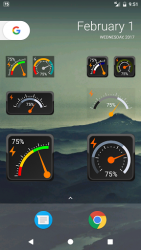
Bored of ordinary battery widgets? All looks the same? Try this analog one! Measure your battery life and have fun. - Do you want to know why this is one of coolest battery widgets on the market?
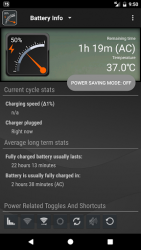
Features:- small, medium and large versions with high quality graphics- battery percent in widget (shows percentage of battery life left)- battery status in status bar (can be turned off!)- configurable battery widget color options- customize look of the widget (colors)- shows temperature and voltage in status bar- experimental support for Motorola 1% (one percent) change detection Notes:
- To improve your phone-s battery you should kill running tasks, adjust screen brightness (volume), turn off wifi, gps, bluetooth and Auto-sync
- Uninstall task killer (to add into ignore list is not enough)
- Please note that very small set of features is donator only.
- Internet access permission is required for crash reports and anonymous usage metrics. Contact me if you need more details.
This app is home screen widget. Long press on home screen to install. If you like this app please rate it!!! If you miss some feature or see bug please DON-T RATE BAD but send me an email! I-ll fix it!
Verdict
Should you install Gauge Battery Widget?
Gauge Battery Widget is an Android application available under the
Freeware
license — the APK is 4.78 MB.
We’ve catalogued it under
Utilities.
✓
Verified clean. Every Gauge Battery Widget APK on SoftLookup is scanned for malware, spyware, and adware. We re-test on every update.
Sponsored
At a glance
Gauge Battery Widget specifications
- Publisher
- Tomas Hubalek
- Last updated
- Feb 18, 2022
- License
- Freeware
- Operating system
- Android
- File size
- 4.78 MB
- Price
- Free
- Page views
- 1160
Sponsored
Help fellow users decide. Share your experience with Gauge Battery Widget.