
Android · Free download · Utilities
Memory Booster - RAM Optimizer7.1.1
- Operating system
- Android
- File size
- 3.80 MB
- License
- Freeware
- Last updated
- Jan 24, 2026
54 downloads·712 page views
Android · Free download · Utilities
54 downloads·712 page views
Screenshots

In depth
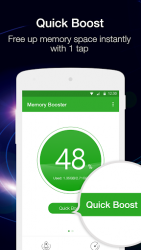
Memory level status and memory usage graph Free memory level is the main factor that affects how fast system runs. Memory Booster shows you real-time free memory level, and provides a live chart to demonstrate how memory changes. One-tap Quick Boost
Quick Boost recovers memory by killing running tasks, cleaning cache and system garbage. It rescues your phone from running slow and behaving abnormal in no time.
Speed Boost the Optimized Task iller
Running apps keeps restarting themselves after being killed. To resolve this issue, Speed Boost provides a Super Boost feature to stop most running apps from restarting by using Accessibility feature in system settings.
Startup Boost
Some apps automatically start themselves when device reboots. Startup Boost shows all these apps and helps to prevent them from auto-starts.
Customizable Auto Boost Features
To make memory boosting easier, Auto Boost can be set at different boost levels (General, Optimum and Ultimate boost) with multiple boost strategies: auto boost at regular interval, or when memory drops down to a certain level or when device is locked.
Whitelist Manager/Ignore List
Whitelist Manager protects fatal system processes from being killed. And it allows you to add favorite apps or remove unnecessary apps from the list.
Homescreen widgets, shortcuts and status bar icon (optional)
Homescreen widgets, shortcuts and status bar icon provide memory info and boosting options outside the main app. With these, monitoring and handling memory issue becomes easy and handy.
Verdict
Memory Booster - RAM Optimizer is an Android application available under the Freeware license — the APK is 3.80 MB. We’ve catalogued it under Utilities.
At a glance
Help fellow users decide. Share your experience with Memory Booster - RAM Optimizer.