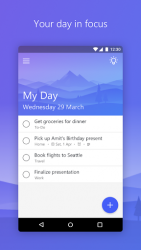
Microsoft To-Do is a simple and intelligent to-do list that makes it easy to plan your day. Whether it-s for work, school or home, To-Do will help you increase your productivity and decrease your stress levels. It combines intelligent technology and beautiful design to empower you to create a simple daily workflow. Organize your day with To-Do-s smart Suggestions and complete the most important tasks or chores you need to get done, every day. To-Do syncs between your phone and computer, so you can access your to-dos from school, the office, or the grocery store or even while you-re traveling around the world. You can quickly add, organize and schedule your to-dos while you-re on the go. With important to-dos that you really shouldn-t forget you can add reminders and due dateswe-ll remember them for you. And if you have to-dos that you need to tick off on a daily, weekly or yearly basis you can set up recurring due dates to remind you each and every time. You can also use To-Do as a note-taking app, adding detailed notes to every to-do-from addresses, to details about that book you want to read, to the website for your favorite caf. You can collect all your tasks and notes in one place to help you achieve more. What areas of your life do you want to be more productive in? You can have a color-coded list for each. Now you can quickly add your homework to one list, your groceries to another, your packing list, your work projects and your home DIY projects to yet more lists. You can create as many lists as fits your lifestyle. And if you follow a productivity system such as GTD (David Allen-s Getting Things Done Methodology) then you can create a Someday list or a Follow-up list. To-Do is here for you, whether your goals are for this week or in 5 years time. Plan what you want to focus on each morning and give yourself a powerful productivity boost for the day. This simple to-do list app is free to download and use. It includes customizable themes, notes, reminders, due dates, smart Suggestions, and syncing across multiple devices. In short, everything you need to manage your life and accomplish more. Completing your tasks or chores has never been so easy. Errands just got a little more enjoyable with To-Do. It is the task management tool you need to add to your daily arsenal.
Microsoft To-Do 2.100.590.01
Is a simple and elegant to-do list app that helps you jot down any piece of information in just a few seconds. You can note down any task, link it to a specific date, create notifications, and even apply weekly or monthly reminders. The most appealing feature of microsoft to-do is its interface which is both beautiful and useful. You just need to click on the screen and enter any task. Once noted you can add any details you want. One more click and it's marked as complete. On the left side of the screen you can manage your different tasks. By default you have just two lists: ‘to-do’ and ‘my day. ’ but you can add as many lists as you’d like – for example, you could have a shopping list, a favorite video game list, or even a work list. Ppmicrosoft to-do is a great to-do list app that has simple but very efficient features and a completely customizable and beautiful interface.
Microsoft To-Do is an Android application available under the
Freeware
license — the APK is 10.82 MB.
We’ve catalogued it under
Business.
Help fellow users decide. Share your experience with Microsoft To-Do.