In depth
A closer look at Wabbitemu
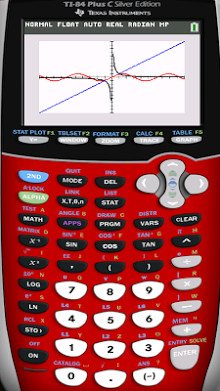
Wabbitemu creates a Texas Instruments graphing calculator right on your Android device. Wabbitemu supports the TI-73, TI-81, TI-82, TI-83, TI-83 Plus, TI-83 Plus Silver Edition, TI-84 Plus, TI-84 Plus Silver Edition, TI-85, and TI-86. Fast and convenient, Wabbitemu allows you to always have your trusty calculator with you. Because Wabbitemu is an emulator, the calculator it creates will act exactly like the real thing. Wabbitemu, like all emulators, requires a ROM image. Wabbitemu includes an easy to use setup wizard that will help you create a ROM image for your TI. Frequently Asked Questions: 1. How do I bring up the menu? You can bring up the menu by swiping from the left edge of the screen, or pressing the menu key (if your device has one). 2. How do I disable vibration when I tap on a button? Open the menu and click on settings. Under the ‘Skin- category unselect ‘Vibrate on keypress- 3. How do I load apps like PlySmlt2 or Inequalz? To load any file to your calculator you need to first download it to your SD card or internal storage on your device. You can find the official TI applications for the 84 Plus (non color). Once you have downloaded the app to your device open Wabbitemu. Swipe from the left edeg of the screen to bring up the menu, and select ‘Load file-. Find the file you just downloaded in the list and select it. The file will be sent to your calculator. Apps for the 83+ and 84+ calcs will end in .8xk. Apps for the 84+CSE will end in .8ck or .8xk. 4. I-m missing fraction options when I press Alpha+F1! How do I get these fraction options? Fraction options (and the rest of the Alpha+FN menus) are only available on OS 2.55 MP. Wabbitemu allows you to download both 2.43 and 2.55 MP. You can check your OS version by hitting ‘2nd- then ‘+-. Then press enter to go to the about screen. If it not 2.55 MP or 2.53 MP you will need to upgrade. To upgrade you will need to recreate your ROM by going through the setup wizard again. The setup wizard is runnable if you bring up the menu by swiping from the left edge of the screen. Then select ‘Re-run setup wizard-. As you go through the setup make sure you have selected OS 2.55 MP on the OS selection screen.
Verdict
Should you install Wabbitemu?
Wabbitemu is an Android application available under the
Freeware
license — the APK is 7.9M.
We’ve catalogued it under
Business.
✓
Verified clean. Every Wabbitemu APK on SoftLookup is scanned for malware, spyware, and adware. We re-test on every update.
Sponsored
At a glance
Wabbitemu specifications
- Publisher
- Developer
- Last updated
- Feb 7, 2026
- License
- Freeware
- Operating system
- Android
- File size
- 7.9M
- Price
- Free
- Page views
- 1000
Sponsored
Help fellow users decide. Share your experience with Wabbitemu.