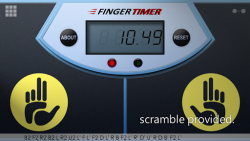
Finger Timer is a speedcubing/speedstacking timer in your pocket!
It's a simple and elegant timer app that you must have!
[HOW TO USE]1. Put your fingers on the left and right pads, and hold.
2. When the red and green lights are both on, the timer is ready, and then you can release your fingers to start the timer.
3. When you want to stop the timer, put your fingers back on the left and right pads.
4. If you want to restart the timer, press "RESET" and do the steps 1 to 3.
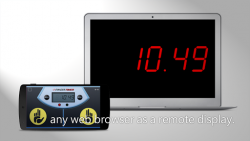
[DISPLAY CONNECTION]1. Connect your Timer device (with this app) and Display device (any computer or mobile device with a web browser) to the same Wi-Fi network. (Sometimes Internet also works.)
2. In Timer device, tap the top-right icon, and check "Allow display connection" checkbox.
3. In Display device, enter the Timer address into the address bar of your browser, and then press "START".
4
Finger Timer is an Android application available under the
Freeware
license — the APK is 13.84 MB.
We’ve catalogued it under
Lifestyle.
Help fellow users decide. Share your experience with Finger Timer.