In depth
A closer look at Topping Play dodol theme
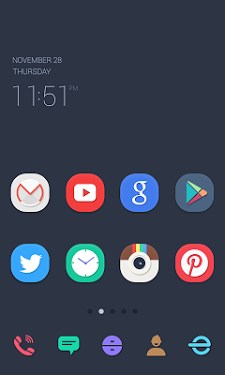
Topping Play dodol theme Apply the theme to transform your background screen, icon and launcher widget! How to apply a theme-- Install Dodol Launcher (if you haven-t yet).
- Press the home button and set the Dodol Launcher as the default home launcher by selecting [Use as default value for this task] or [Always].
- Open the launcher menu by swiping the home screen upwards, select the [Theme] menu, then select and apply the theme of your choice. Precaution-- Is available only in Android ver. 4.0.3 and above (ICS, Jellybean)- Some functions cannot be applied in certain devices. Customer Support-- m.help.naver.com/serviceMain.nhn?falias=mo_launcher_app-type=faq- blog.naver.com/dodolhome- facebook.com/dodolhome Why Dodol Launcher is so special-- Cute, simple, vibrant, sophisticated, cuddly and warm themes are continuously updated- The default widget offers convenient functions, including quick switch and memory cleaner- Apps/widget can be used easily with the dock and alert shortcut list- Offers functions that can be used to decorate fonts/ringtones/keyboards- Offers detailed functions for screen rotation/individual icons/folders etc-- Supports functions in a convenient and stable manner by copying the home screen and creating backups of settings
Verdict
Should you install Topping Play dodol theme?
Topping Play dodol theme is an Android application available under the
Freeware
license — the APK is 1.2M.
We’ve catalogued it under
Collection.
✓
Verified clean. Every Topping Play dodol theme APK on SoftLookup is scanned for malware, spyware, and adware. We re-test on every update.
Sponsored
At a glance
Topping Play dodol theme specifications
- Publisher
- Developer
- Last updated
- May 4, 2026
- License
- Freeware
- Operating system
- Android
- File size
- 1.2M
- Price
- Free
- Page views
- 1213
Sponsored
Help fellow users decide. Share your experience with Topping Play dodol theme.