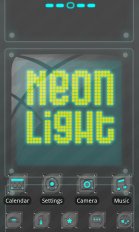
Cool Metal Style with neonlight! Designed by ZT.art Team! Covers icons, wallpaper, folders interface and app drawer. Get it and have a completely new makeover of your smartphone with android OS at once!
=Brief introduction:
Cool Metal Style with neonlight!
Designed by ZT.art Team! Covers icons, wallpaper, folders
interface and app drawer. Get it and have a completely new makeover
of your smartphone with android OS at once!
=Important tips:
This app only works with GO Launcher EX.
Install GO Launcher free from the market first.
How to Apply the Theme:
1.Please Do Not open directly after it-s installed.
2.Back to GO Launcher EX: MENU > theme preferences.
3.Choose and apply the theme.
Change icons:
Some devices may not change the icons automatically.
1.Tab and hold an app in desk screens.(Not available in app list.)
2.Replace > Choose the theme-s icons.
Circle Effect:
1.Only works in App list, MENU > Settings > Icon effect > Chariot
Thanks for your support!
Neonlight Theme GO Launcher EX is an Android application available under the
Freeware
license.
We’ve catalogued it under
Collection.
Help fellow users decide. Share your experience with Neonlight Theme GO Launcher EX.