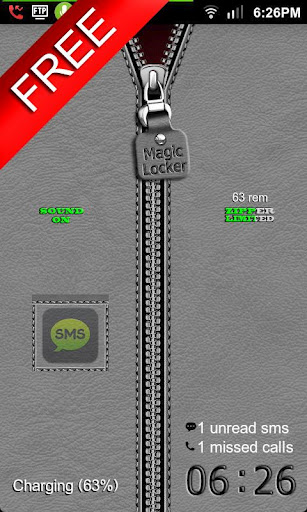
In depth
A closer look at Zipper II Free - MagicLocker
Zipper II Free MagicLockerTheme-
It a Magic Locker Theme App.
To run this theme app, you must install Magic Locker App first.
(Follow the installed theme app indication or search mobi.lockscreen.magiclocker- in Google Market)
-
- Author : xavierjohn22
- Description :
Unlock to home. Get the paid version for more features.
-
Q&A:
Q: How to find more Magic Locker Themes?
A: You can press More Themes- button in MagicLocker Setting--Themes Tab-.
Or search mobi.lockscreen.magiclocker.theme- in Google Market directly.
Q: How to install Magic Locker Themes?
A: After you install a Magic Locker theme app, you need to run the theme app and press
Install this theme- button in the theme dialog.
Q: How to uninstall Magic Locker Themes?
A: You can long press theme in MagicLocker Setting--Themes Tab- then press Uninstall theme-.
Or go to the System Setting--Applications--Manage applications- then find the theme App to
uninstall as general App.
Q: Why the Lost Robot- theme can-t be ininstalled form MagicLocker?
A: Lost Robot- is the default theme in Magic Locker and MagicLocker must ensure there is at least
one theme exist.
Q: Why a theme disappeared from MagicLocker Setting-- Themes Tab-?
A: First, please ensure your SD card is available, if yes, please try to reinstall the theme app.
Verdict
Should you install Zipper II Free - MagicLocker?
Zipper II Free - MagicLocker is an Android application available under the
Freeware
license.
We’ve catalogued it under
Collection.
✓
Verified clean. Every Zipper II Free - MagicLocker APK on SoftLookup is scanned for malware, spyware, and adware. We re-test on every update.
Sponsored
At a glance
Zipper II Free - MagicLocker specifications
- Publisher
- Developer
- Last updated
- Feb 4, 2026
- License
- Freeware
- Operating system
- Android
- Price
- Free
- Page views
- 1177
Sponsored
Help fellow users decide. Share your experience with Zipper II Free - MagicLocker.