
Android · Free download · Collection
Slider Widget - Volumes0.9.8.2
- Operating system
- Android
- File size
- 1.31 MB
- License
- Freeware
- Last updated
- May 5, 2026
32 downloads·1183 page views
Android · Free download · Collection
32 downloads·1183 page views
Screenshots
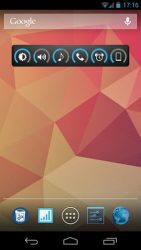
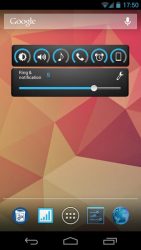
In depth
- "Overall, Slider Widget is incredibly easy to use and very intuitive." -
(Paul Wilks - androidtapp) - "So many apps try to do too much, or be too clever, but Slider Widget gets the balance right." -
(Bobby's Blog) A small Widget that gives control of the screen brightness and the sound volume directly from your home screen. You can easily manage those with the widget's slider or your hardware buttons. With a double click, you can also use the buttons to toggle. Slider Widget shows 6 Categories (e.g brightness or ring volume), which you can choose from 7 categories (more below). You can also change the order of the categories displayed in Slider Widget.
Slider Widget is primary a Widget. So you have to add it to your home screen. - Displays brightness and volumes - Control screen brightness
or set auto brightness (on/off) - Control volumes
ringtone
media
notification
alarm
system
voice call - 3 input options
change values with the slider
change values with hardware (up/down buttons)
use buttons with double clicking to toggle (BETA) - 4 widget sizes: 1
1, 2
1, 3
1 and 4
1 - Position of the slider can be changed (all 4 directions) - Color theme can be changed
green
ICS blue
yellow
red
orange
white
black
transparent background (on/off) - Categories to show in the widget and their order can be set - Indicator shows if notification and ring volumes are connected // not with honeycomb and ics - more Settings like
notification uses ring volume (on/off) // not with honeycomb and ics
play confirmation sound if volume changes (on/off)
toggle function can be de-/activated for each category
-- Languages: English, Arabic, Turkish, French, German, Polish, Russian, Spanish, Italian, Norwegian, Portuguese, Dutch, Catalan, Czech, Serbian, Ukrainian, Dutch, Greek, Indonesian, Japanese, orean, Chinese Simplified, Chinese Traditional Slider Widget needs the following permissions
WRITE_SETTINGS to change e.g the screen brightness
INTERNET to report bugs
VIBRATE to vibrate if going into vibration mode
If you want to help translating Slider Widget into your language, you can! There is an Crowdin project:
crowdin.net/project/slider_widget/invite
NOTICE!: There is a systemwide Bug on some ICS devices that widgets aren't shown in the widget section after their installation. After a force close of the launcher or a reboot the widget should be shown. Sorry for that.
Verdict
Slider Widget - Volumes is an Android application available under the Freeware license — the APK is 1.31 MB. We’ve catalogued it under Collection.
At a glance
Help fellow users decide. Share your experience with Slider Widget - Volumes.