
Awesome icons icon

Android · Free download · Collection

Awesome icons

Operating system
Android
File size
1.9M
License
Freeware
Last updated
May 5, 2026

55 downloads·753 page views

Screenshots
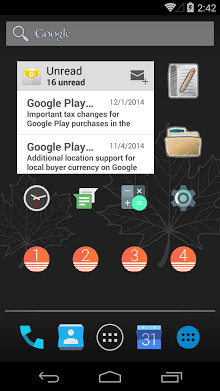
See Awesome icons in action

Awesome icons screenshot 1

In depth

A closer look at Awesome icons

Awesome Icons lets you customize your home screen icons with icon packs and your own pictures. It works with any launcher and does not require root.
Download icon packs from the Play store and mix icons freely from any of them. You can also use your own pictures from the gallery or the camera to create your own icons. With Awesome Icons, you choose the style of each home screen icon individually. Creating customized icons is easy: find the application and the icon pack you want, and create your new home screen icon with a single tap. You can also customize the label of the application or remove it completely. You can use the app to personalize your icons with any launcher, including the stock Android launcher and the Google Now launcher.
:
Draw your own icons on paper and use the camera.
Create icons with empty labels for a minimalistic look.
Use a different style on each home screen page. Features:
Create customized icons for any application on your phone or tablet
Pick any image from the gallery to use as an icon.
Take pictures with the camera to create your own icons.
Use icons from any icon pack installed from the Play store.
Full access to all icons from all icon packs: use any icon for any app.
Customize the label for your icons or remove it completely.
No third party launcher or root is required.
No impact on performance or battery life
Works on any phone or tablet. Please note that this app only changes home screen icons, not icons in the app drawer of your launcher.
If you have any suggestions or questions, or find an unsupported icon pack, please let us know at apps-momocode.com.

Awesome icons 0.15.3

Pawesome icons is a customization app that lets you easily edit the icons on your android to change their look and even the text that appears underneath. It's very intuitive by default you'll see a list of the applications you have installed on your device and their respective icons. If you have installed additional icon packages in the drop-down menu you can easily access these. Then you can download free icon packages with just a single tap on the screen.

to change an icon using awesome icons, you just have to press on the application icon you want to customize and choose one of the following options: selecting an image that you have on your device, taking a picture in the moment, or selecting an icon from the packages installed. You will also be able to change the text. Amazing icons is an excellent application to customize your android which allows you to give it a unique and personal look. Very useful when combined with other icon packages.

Verdict

Should you install Awesome icons?

Awesome icons is an Android application available under the Freeware license — the APK is 1.9M. We’ve catalogued it under Collection.

Verified clean. Every Awesome icons APK on SoftLookup is scanned for malware, spyware, and adware. We re-test on every update.
Sponsored

At a glance

Awesome icons specifications

Category
Collection
Publisher
Developer
Last updated
May 5, 2026
License
Freeware
Operating system
Android
File size
1.9M
Price
Free
Page views
753
Sponsored

Leave a comment

Help fellow users decide. Share your experience with Awesome icons.

Download Awesome icons