In depth
A closer look at Ivy Draw: Vector Drawing
Ivy Draw is a vector based drawing application for creating high quality vector drawings and designs. Change anything you want, whenever you want, no need to get things perfect first time.
Draw, design and create: illustrations, design work, colourful posters, cartoons, postcards, invitations, meme pictures, icons and logos, diagrams and more.
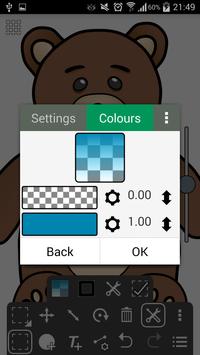
Powerful tools that allow you to quickly draw shapes, text, lines and curves. Fill with solid colours, gradients or even use your own pictures or photos. Add special effect blurs, glows and shadows.
Share your creations with your friends as JPEG or PNG images with quality settings and a preview function.
Features:
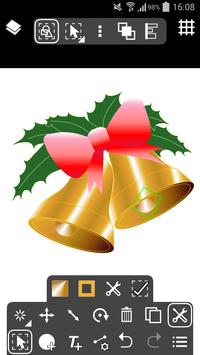
Ivy Draw has a touch optimised user interface: Pinch-to-zoom and panning. Quickly select objects even when underneath others by tapping. Multi-selection, move and change the colour of multiple objects at once. Finger view, displays a small window while dragging showing the view immediately under your finger.
Sizes and Units: Supports Centimetres, Millimetres, Inches and Points with three decimal places. Select from a list of common page sizes or define your own.
Actions: Undo and Redo, Move, Resize, Rotate, Ordering (Send backwards etc.), Alignment, Copy and Paste, Horizontal and Vertical flipping.
Layers: support for multiple layers, reordering, opacity and visibility.
Shape Tool: Select from a range of icons and shapes including circles and rectangles, many with customisation such as the number of points of a star. You can convert geometric shapes to editable Paths.
Text Tool: Place text using a number of included fonts (or with your own custom fonts) using Bold, Italic and Underline styles with vertical and horizontal alignments including full justification.
Path Tool: Draw paths to create custom shapes or arrows using any combination of straight lines and Bezier curves. Not just for experts; automatically fitted curves and freehand mode make it simple and easy to use. Turn on control points to take direct control and design the exact curve you want.
Premium Features:
Ivy Draw offers a seamless in-app upgrade to unlock the following premium features:
Export as SVG: Export your drawings in all their vector glory using the Scalable Vector Graphics format, great for use on the web.
Unlimited Layers Create as many layers as you need.
Locking and Grouping: Lock objects to prevent accidental editing, restrict selection to only locked or unlocked objects. Group multiple objects together.
Import Drawing: Allows previously saved Ivy Draw drawings to be imported into the current drawing.
Multicoloured gradients: Choose more than two colours; create unique multi-coloured gradients, rainbows and more with up to 20 colours.
Advanced Colour Picking: Unlock the advanced colour picker and allow colours to be selected by RGB, HSV or Hex values.
Grid Tool: A fully customisable grid with object snap-to-grid and rotation snap.
Stamp Tool: Stamp Shapes and Text with a single tap, with optional random sizes and rotations.
Object Properties Dialog: Directly enter and update an objects size, position and rotation.
Dash Patterns: Customise and design your own dash patterns for dashed lines and outlines.
Adfree: Remove all advertising.
Requirements
Device requirements
Android 4.0+
Verdict
Should you install Ivy Draw: Vector Drawing?
Ivy Draw: Vector Drawing is an Android application available under the
Freeware
license — the APK is 4.2 MB.
We’ve catalogued it under
Graphics.
✓
Verified clean. Every Ivy Draw: Vector Drawing APK on SoftLookup is scanned for malware, spyware, and adware. We re-test on every update.
Sponsored
At a glance
Ivy Draw: Vector Drawing specifications
- Publisher
- Shoebill Software
- Last updated
- May 5, 2026
- Requirements
- Android 4.0+
- License
- Freeware
- Operating system
- Android
- File size
- 4.2 MB
- Price
- Free
- Page views
- 1650
Sponsored
Help fellow users decide. Share your experience with Ivy Draw: Vector Drawing.