In depth
A closer look at JUMP PAINT by MediBang
-A completely free app for creating official Weekly Shonen Jump manga and illustrations!!
G-pens, Mapping Pens, Tones and Backgrounds are all free to use!!
-Practice with your favorite manga by using past and present Jump serialized pieces!!
Full of secrets from past and present Jump authors like One Piece's Eiichiro Oda and My Hero Academia's ohei Horikoshi!!
-Learn techniques on how to create a manga from Jump's editorial department!!
Loads of lessons on story, character creation and dialogue!!
-You can also enter Jump contests!!
The app will give you information on each contest. Don't miss out!!
What is JUMP PAINT?
It's the ultimate app for creating manga and illustrations -- a collaboration between MediBang Paint (12 million downloads) and Weekly Shonen Jump.
JUMP PAINT was developed to provide an environment for creators to draw anytime and anywhere using MediBang Paint's features.
JUMP PAINT is the perfect paint software for creating illustrations and manga. It comes with many features to enjoy drawing illustrations and manga, like a multitude of brushes, materials and manga fonts.
- Draw Anywhere!
مم
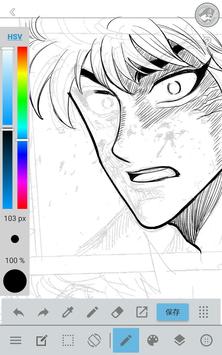
With JUMP PAINT you can have almost all the features of a desktop painting program in your pocket.
مم
Despite being packed with so many features, the interface of JUMP PAINT has been designed especially for the iPhone in mind.
مم
The UI can be closed and opened in one touch.
مم
The sleek interface allows users to change brush sizes or color modes with ease.
- Painting Tools
مم
90 free brushes!!
مم
In addition to the Pen, Pencil, Watercolor, Blur, Smudge, G Pen, Mapping Pen, Rotation Symmetry and Edge Pens, we have added over 50 different kinds of brushes, including the Brush, Flat Brush, Round Brush, Acrylic, School Pen, and Soft Pastel.
مم
Force Fade In and Out make your lines sharp even if youre drawing with your fingers.
Users can create their own custom brushes.
- Free Resources
800 different types of free tones and backgrounds.
Premade clouds, buildings, and vehicles are included.
Tones can be added with one simple touch.
- Layers
Comes with layers complete with blending modes.
Can be used to preserves different elements of you work.
- Comic Fonts
Use them to change the atmosphere of your comics.
Use them to define your characters moods or personalities.
50 fonts used by industry professionals available.
- Comic Creation
Just drag across the screen to create comic panels.
Freely transform their shape.
- User Friendly
Includes customizable shortcuts
Geared towards first time users.
Has an interface designed to give artists room to draw.
One touch to access full-screen mode.
- Other Tools
Guides for drawing in perspective, or creating lines, and curves.
Correction to stabilize your line strokes.
- Photo Reference
مم
You can take photos in the app and use them as references on a different layer.
مم
Use them for reference or learning how to draw new things.
- Cloud Storage
You can backup and manage your data safely.
Easily transfer your work.
- Manage Project
Save and manage multipage documents.
- Syncability
You can sync your preset settings with the PC version of JUMP PAINT.
- Team Creation
You can collaborate on work with friends no matter where you are.
- Auto Recovery
Your data is automatically backed up if your device crashes.
Requirements
Device requirements
Android 4.4+
Verdict
Should you install JUMP PAINT by MediBang?
JUMP PAINT by MediBang is an Android application available under the
Freeware
license — the APK is 20.4 MB.
We’ve catalogued it under
Graphics.
✓
Verified clean. Every JUMP PAINT by MediBang APK on SoftLookup is scanned for malware, spyware, and adware. We re-test on every update.
Sponsored
At a glance
JUMP PAINT by MediBang specifications
- Publisher
- MediBang Inc.
- Last updated
- May 3, 2026
- Requirements
- Android 4.4+
- License
- Freeware
- Operating system
- Android
- File size
- 20.4 MB
- Price
- Free
- Page views
- 1587
Sponsored
Help fellow users decide. Share your experience with JUMP PAINT by MediBang.