Android · Free download · Business
PDF Reader3.1
- Operating system
- Android
- File size
- 4.8M
- License
- Freeware
- Last updated
- May 5, 2026
86 downloads·1242 page views
Android · Free download · Business
86 downloads·1242 page views
Screenshots
In depth
Ppdf reader is an interesting app that lets you read any document directly from your smartphone in pdf format.
thanks to pdf reader, you can use your device as if it were practically an ebook. This app allows you to quickly and easily process any pdf document on your smartphone. The pdf reader is simple to use. The complex file recognition system based on the format eliminates the need for any configuration before using the software. This means you can save valuable time without having to search for the document you want to open on the device. The app will automatically collect all the documents you have in pdf format and they will appear directly on the main menu organized alphabetically. To open any file you just have to select it on the main menu and it will show you the best possible quality. Also, pdf reader includes integrated tools to zoom, print, adjust brightness, and merge pdf documents.
read your favorite books, comics, or any other document that interests you as quickly and easily as possible, directly from your smartphone thanks to pdf reader.
It is a very interesting application that offers you a perfect solution to open all the documents in pdf format that you have stored in the memory of your android device. Forget annoying incompatibility problems and check them whenever you need to. Once you open the pdf reader you will see its home page which will list all the pdfs saved on your device up to that moment. The best thing is that it will present them in order and in different folders. In order to open them you simply have to tap them and then the first page will appear practically occupying the entire screen of your smartphone.
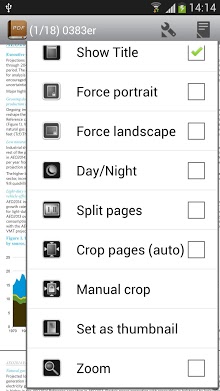
as you can see, pdf reader will not only give you the possibility to open pdf files, but you will also be able to quickly locate the parts you are most interested in by searching by page number. And in order to make reading even more easy it will allow you to zoom in or zoom out as much as you need to read the text comfortably. In low light conditions you can also switch to night mode to protect your eyesight.
in short, pdf reader is an excellent application to open all the documents in pdf format that you have saved on your device.
It is a tool to open any pdf document on your android device. As a result of its easy-to-use interface you can easily manage all the documents in your memory and also import new documents via email or other devices. A pdf reader also lets you add notes to any document as well as highlight and strike text. It's possible to save all the changes you make to a document or to undo them if you prefer. Simply you can handle pdf documents as if they were paper documents. It is an app that allows you to easily read any pdf file on your android device. An indispensable app to have installed, just in case.
It is a lightweight pdf document reader. But it doesn't offer a lot of spectacular features or anything like that. It simply lets you open and read any pdf document on your device. No more, no less. It's a convenient pdf reader that is easy to use.
With the pdf reader app you can open any pdf document on your android device. Opening for the first time the app displays all compatible documents on the device. In addition to reading pdf files pdf reader can also easily create and edit pdf documents with just a single tap. Create a pdf from any text or image file or simply by drawing or writing in the app itself.
not only that, but you can also read pdf files as if they were ebooks with the app's reading mode. While in reading mode, you can view pdfs in full screen, change the screen orientation or text size, and much more!
pdf reader is an excellent app for working with pdf documents. It makes it easy to read, create, and edit pdfs right from your android device.
pdf reader is an application to read text documents that will allow you to open any file in one of the following formats: df, djvu, xps (openxps), fictionbook, cbr, cbz, epub and rtf, as well as pdfs, of course. Pdf reader users see all their books and documents on a virtual book shelf where they can access them at a single click. Once you've opened a book, you can go directly to the page you want, create bookmarks, do text searches, and much more. Pppdf reader also supports dictionary support colordict goldendict fora dictionary aard dictionary dictionary. This feature lets you find any word you don039t recognize by simply pressing your finger on it. It is an excellent reader for android that will turn your device into a pocket-sized ebook to take anywhere you go.
Pdf reader is a great app that lets you manage and consult your pdf files even without an internet connection. A powerful pdf reader that provides an incredibly intuitive and practical experience. Is it possible to view all the pdf documents stored on your device and access them using the tabs on the top menu organized by the most recent as well as those you have marked as favorites by tapping on the.
pdf reader works in a really professional way. That you can easily change the name of files delete them or simply see their details. In addition it's possible to choose the vertical or horizontal page view mode and to search for the important keywords you need to find. You also have the option to change the brightness of the screen and even change the view to night mode to protect your eyesight. Of course the pages you read can be marked with drawings or underlines as needed. If you have a pdf reader you can forget about the time-consuming process of searching for pdf documents in various folders on your device. To open a pdf file just select the pdf file you want to open mark it or share it with your contacts on your social network.
Verdict
PDF Reader is an Android application available under the Freeware license — the APK is 4.8M. We’ve catalogued it under Business.
At a glance
Help fellow users decide. Share your experience with PDF Reader.