BlueDriver is a Premium Diagnostic OBD2 Scan Tool. It is used by professional mechanics worldwide as a great addition to their toolbox and DIYers as their scan tool of choice.
We are here for YOU 24/7/365 Vehicles are expensive and you need to be able to trust the products you are using on them and the people who design and make the scan tool for you. Therefore to create a seamless experience for you the BlueDriver App is designed to work exclusively with our BlueDriver OBD2 Sensor as a complete system and does not work with third party hardware such as ELM devices. The BlueDriver app will automatically search for your BlueDriver sensor using the Bluetooth discovery Location service. To help even more, should you ever have an issue or just want to discuss the product or request new features, we have 24/7/365 English speaking customer support representatives and professional engineers on staff ready to talk and field your emails.
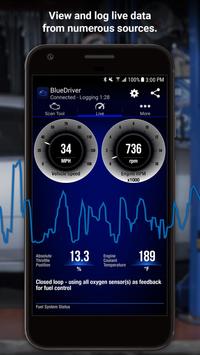
Features: - Generate, print, and share Repair Reports (details below) - Scan For Trouble Codes - Clear Trouble Codes - Enhanced Diagnostics (e.g. ABS, Airbag, Transmission, etc.) for - GM, Ford, Chrysler, Toyota, Nissan (available worldwide) - BMW/Mini, Honda/Acura, Volkswagen/Audi (available in North America) - Mode 6 (On-Board Monitoring Test Results) - Smog Readiness Check - Freeze Frame Data - Multi data (PID) interactive graphing and logging - No Wires! Communicates with your vehicle wirelessly - Metric and Imperial settings
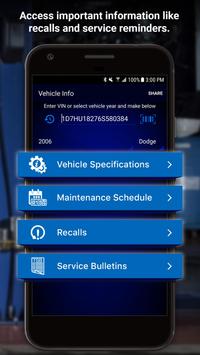
BlueDriver Repair Report Information The BlueDriver Repair Database contains over 6.6 million experienced-based Reported Fixes for Trouble Codes (DTCs). Ranked as Top Reported Fixes, Frequently Reported Fixes and Other Reported Fixes, a BlueDriver Repair Report is specific to your vehicle's year, make and model. The detailed report goes well beyond providing a cryptic code definition by giving you validated fixes for your trouble codes. Save time by using BlueDriver to prioritize how your vehicle can be repaired. Preview a sample Repair Report in App.
IMPORTANT INFO BlueDriver is a professional diagnostic scan tool and the App is free to install but does require the purchase of the BlueDriver Bluetooth OBD2 Sensor to communicate with your vehicle. The Sensor is sold separately under the 'More' tab in App or at www.BlueDriver.net. Repair Reports can be generated without purchasing a Sensor by tapping 'Repair Reports' > 'New Report' and entering the VIN and Trouble Code.
The BlueDriver Sensor simply connects to your data port located inside your car near the steering wheel. Every car made since 1996 has a data port. BlueDriver has global vehicle compatibility and can be used anywhere in the world.
Requirements
Device requirements
Android 4.0.3+
Verdict
Should you install BlueDriver OBD2 Scan Tool?
BlueDriver OBD2 Scan Tool is an Android application available under the
Freeware
license — the APK is 22.5 MB.
We’ve catalogued it under
Automotive.
✓
Verified clean. Every BlueDriver OBD2 Scan Tool APK on SoftLookup is scanned for malware, spyware, and adware. We re-test on every update.