In depth
A closer look at SmartOffice - View and Edit MS Office files and PDFs
SmartOffice is an intuitive, easy-to-use document editing application with a sleek design inspired by the familiar UI of a desktop Office document.
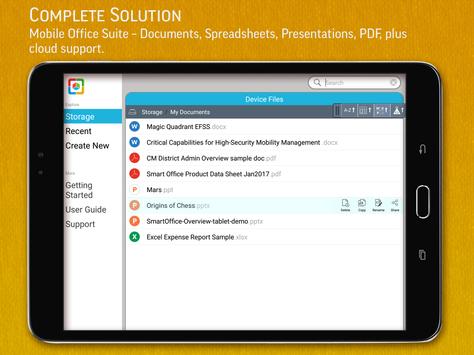
FULL-FEATURED MOBILE OFFICE DOCUMENT PRODUCTIVITY SUITE
SmartOffice is designed to meet the needs of today's mobile world. Users can view, edit, create, present and share MS Office quality documents directly on or from their mobile devices. Our small file size and screen display that adapts to fit your smartphone or tablet make SmartOffice the perfect match for todays on-the-go world.
FREEDOM TO WOR WHILE ON THE GO
- DOCUMENTS: Create new documents using blank or pre-designed templates. Edit existing MS Office documents on your iPhone or iPad.
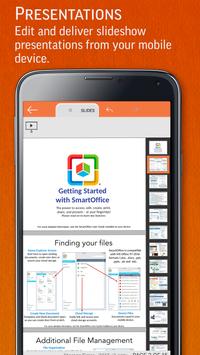
- PRESENTATIONS: View, edit your presentations on your mobile device, then deliver it as a slideshow on your device or via a projector.
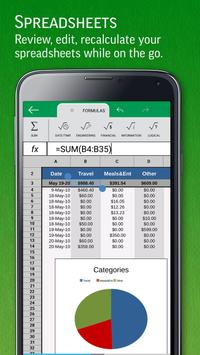
- SPREADSHEETS: Review/edit budgets, expense reports and more while on the go.
ˆ— PDF FILES: View and annotate PDF documents. Convert Office documents to PDF directly on your mobile device.
ˆ— PRINT: Wirelessly print to thousands of supported printers.
COMMON FEATURES ACROSS ALL FORMATS
- View, Edit, Create, Share, Save MS Office documents swiftly and securely.
- Editing: copy, cut, paste, undo and redo.
- Character formatting: bold, italics, underline; font style, size, color & highlight.
- Documents may be saved in original file format or converted to PDFs.
- Screen display adapts to fit smartphone or tablet screen and supports multi-touch gestures.
- All file formats include templates to aid new document creation.
- Password Protection support (Office files) Open, view, edit and re-save encrypted Office documents on your device.
- Cloud support Open and save documents to the cloud with effortless synchronization with Box, Dropbox and Google Drive.
WORD
- Paragraph formatting: indent, alignment, bullets, numbering
- Insert images, shapes, and graphics
- Support for tables, shapes, charts (display)
- Reflow mode for easier reading on a small device
POWERPOINT
- Comprehensive text, paragraph, content formatting
- Shapes, images, textbox editing
- Insert images, shapes, and graphics
- Slide management and reordering
- Slide transition support
- Slideshow: present directly from your mobile device or through a projector
SPREADSHEETS
- Cell formatting options: cell size and alignments, cell/column/row inserts and removal
- Multiple cell types: numeric, date, time, currency, fraction, percentage, scientific & more
- Multiple worksheet support; add/delete sheets
- Chart display and a wide range of formulas
PDF, IMAGE FILES & PRINTING
- View, annotate, highlight and share PDF documents
- Convert, export, save Office documents to PDF format
- View and insert major image types (JPG, PNG, GIF)
- Wireless printing supports thousands of printers
FILE FORMATS
- Microsoft Office: all versions since 1997: Word, PowerPoint and Excel 97, 2000, XP, 2003, 2007, 2010, 2013, 2016 - doc, docx, xls, xlsx, ppt, pptx (view & edit)
- PDF Viewer, PDF Reader, Save as PDF
- JPEG, PNG, GIF,TIFF, BMP images (view); HWP (view)
- Vector WMF and EMF diagrams (view)
LANGUAGES over 35 supported
ˆ— Application localized for: Chinese (Simplified), Chinese (Traditional), English, Japanese, French, German, Italian, orean, Polish, Portuguese (Portugal), Portuguese (Brazil), Russian, Spanish (Spain), Spanish (Mexico), Dutch and Turkish.
ˆ— View documents in the following languages: Arabic, Azerbaijani, Chinese (Simplified), Chinese (Traditional), Czech, Danish, Dutch, English, Faroese, Finnish, Greek, Hungarian, Italian, Japanese, orean, urdish, Latvian, Lithuanian, Maltese, Norwegian, Polish, Portuguese (Portugal), Portuguese (Brazil), Russian, Scots Gaelic, Slovak, Slovenian, Spanish (Spain), Spanish (Mexico), Swedish, Turkish, Vietnamese, Yiddish.
Requirements
Device requirements
Android 4.4+
Verdict
Should you install SmartOffice - View and Edit MS Office files and PDFs?
SmartOffice - View and Edit MS Office files and PDFs is an Android application available under the
Freeware
license — the APK is 14.5 MB.
We’ve catalogued it under
Business.
✓
Verified clean. Every SmartOffice - View and Edit MS Office files and PDFs APK on SoftLookup is scanned for malware, spyware, and adware. We re-test on every update.
Sponsored
At a glance
SmartOffice - View and Edit MS Office files and PDFs specifications
- Publisher
- Artifex Software Inc.
- Last updated
- May 5, 2026
- Requirements
- Android 4.4+
- License
- Freeware
- Operating system
- Android
- File size
- 14.5 MB
- Price
- Free
- Page views
- 1131
Sponsored
Help fellow users decide. Share your experience with SmartOffice - View and Edit MS Office files and PDFs.